Everything Rabab Tuner does.
Thirteen parts of one app, all of it running on your phone. Everything below is what the app actually does, described the way a player would describe it — and all of it is included in the one subscription — one month free, then $8 a year.
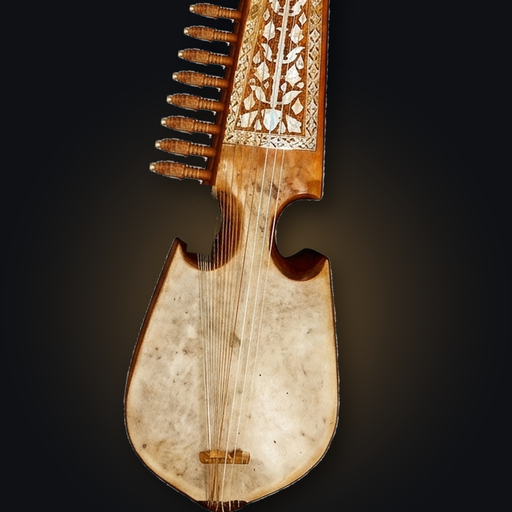
Built for the Afghan rubab — also written rabab or robab, and called the Kabuli rubab — not for guitars, and not for the bowed rebab.

Animated preview of the tuning screen
Made for a string that won't sit still.
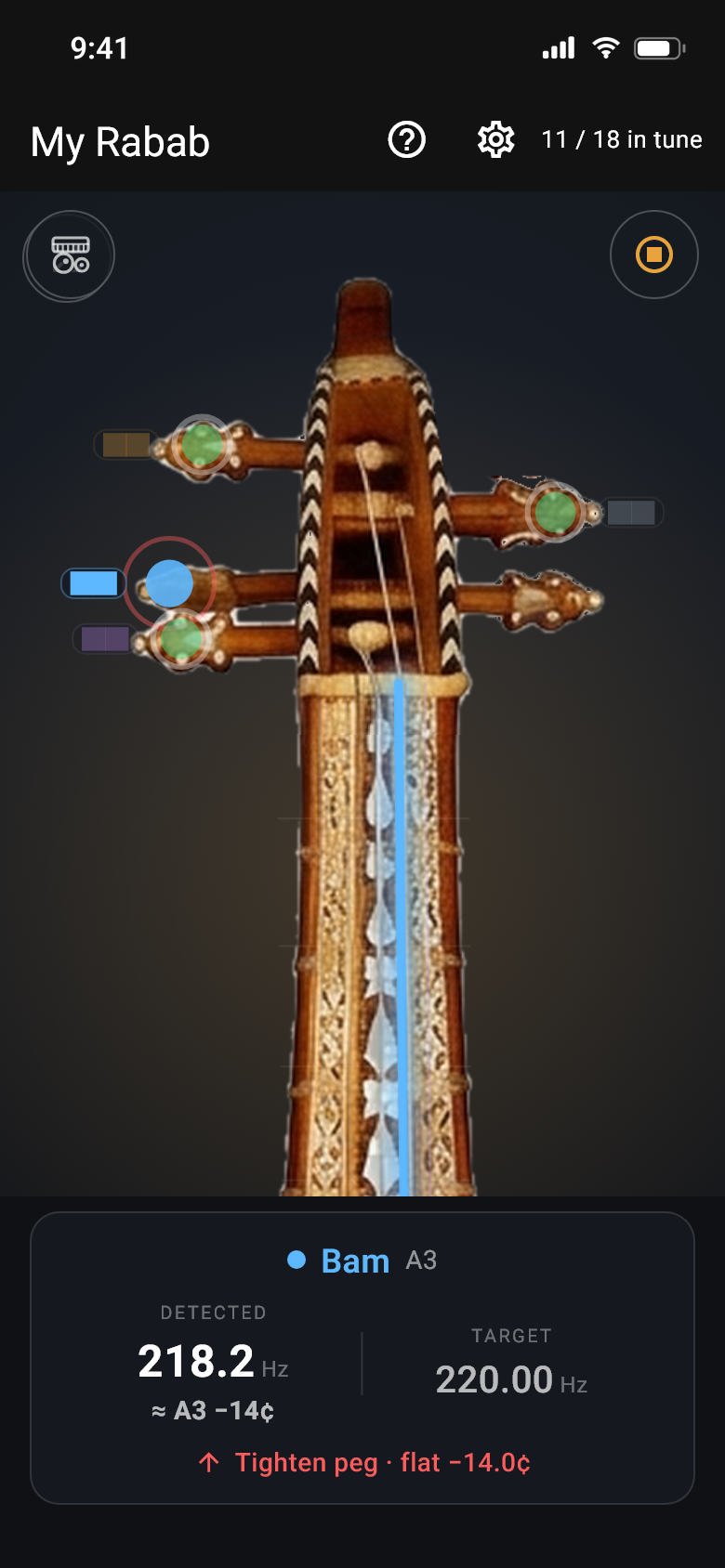
A plucked string is a moving target. It sags a little as it rings, and the thick low Shahtar are the hardest of all to read — their sound is full of higher notes that fool ordinary tuners. Rabab Tuner was built around exactly this instrument, so it follows the pitch as it settles instead of jumping about.
- In tune means in tune — the string has to hold steady, not just pass through the right spot for a moment.
- It uses words — "Loosen peg · sharp", "Close — tiny turns", "Hold steady…", then a green "In tune".
- It knows what you played — pluck any string and the right one lights up, even without choosing it first.
- Fretted notes too — play up the neck and it reads "Katay · fret 3", not just open strings.
- It never tunes to itself — while it is playing you a reference note, it stops listening.
- The screen stays awake while you tune, and comes back on its own if something interrupts the microphone.
In short
- What it can hearevery string on the Rabab
- How often it answersabout 50 times a second
- Close enoughwithin 5 cents
- When it locksonce it holds there
- The diala quarter tone either side
The picture is redrawn for your Rabab.
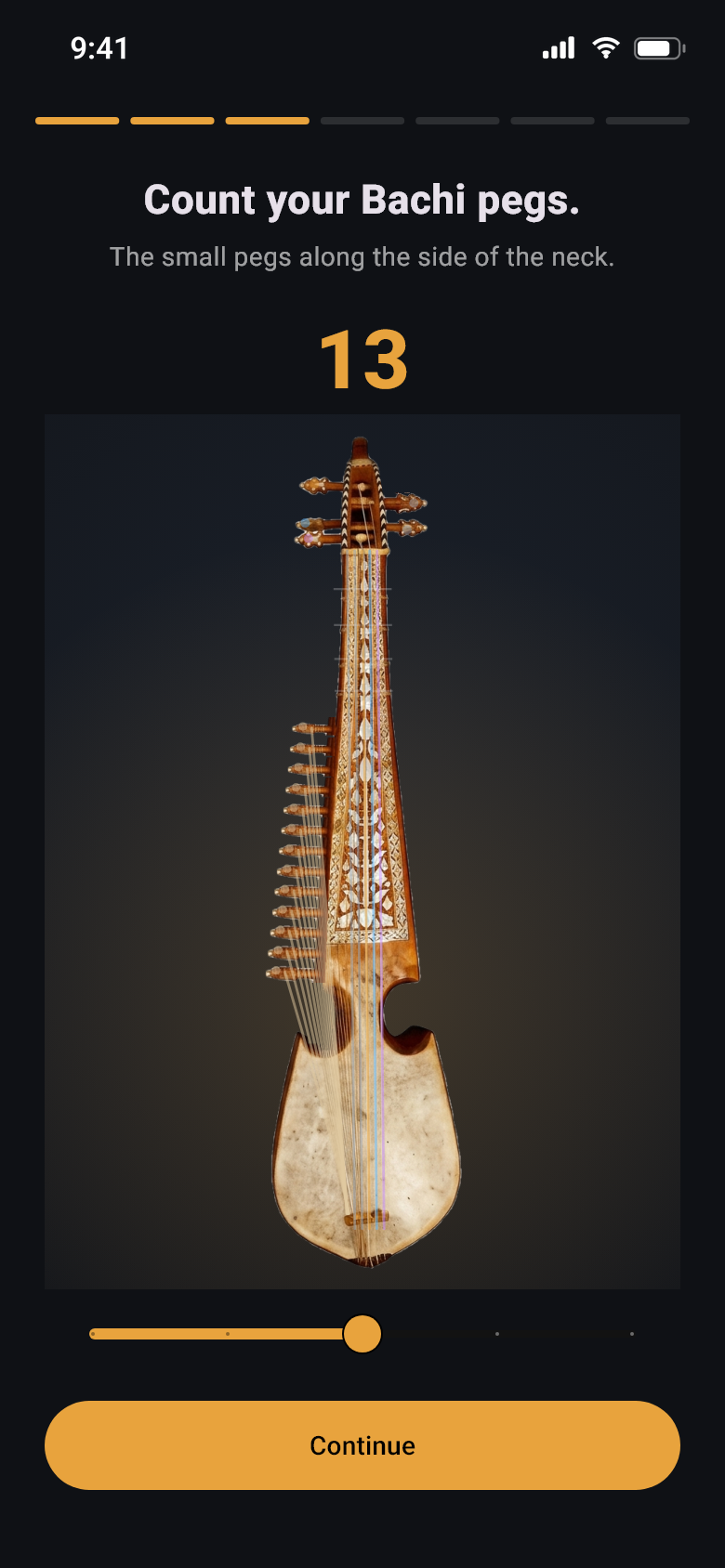
No two Rababs are the same, so the app asks. Five questions later the instrument on screen is yours: the right pegs on the headstock, the right number down the Bachi rail, frets in the right places, and every string tied to the peg that actually tunes it.
- 2 or 3 Shahtar · 11 to 15 Bachi · 4 to 8 frets · pegs 3+2 or 2+3
- Any concert pitch — 440, 444 with a tabla, or wherever your group plays.
- Swap the pegs around — choose which peg tunes which string; picking a taken one simply swaps the two.
- Set any pitch by hand — type the frequency you want and the app names the note for you.
- More than one Rabab? Save each as its own setup. Loading a tuning never disturbs your peg arrangement.
- The view follows you — pick a string and it slides gently up to that peg, then back out again.
Five ready-made tunings
Tap any of them and it plays Katay, Bam and Zer in turn, so you can hear it before you choose.
The standard setup — 18 strings at 440
The Bachi climb a D-major ladder from D4 to B5. This is a starting point, not a rule — see the rubab tuning guide for why the right pitch depends on your instrument.
| String | What it is | Note | Pitch |
|---|---|---|---|
| Katay | Melody · nylon | E3 | 164.81 Hz |
| Bam | Melody · nylon | A3 | 220.00 Hz |
| Zer | Melody · nylon | D4 | 293.66 Hz |
| Shahtar 1 | Drone · steel | A2 | 110.00 Hz |
| Shahtar 2 | Drone · steel | D3 | 146.83 Hz |
| Bachi 1–13 | Sympathetic · steel | D4 → B5 | 293.66 – 987.77 Hz |
A real Rabab, not a beep.
Every note the app plays you started life as a recording of a real Rabab — twenty-four plucks in all, covering the nylon melody strings, the steel Shahtar and the small Bachi. The app reshapes the nearest recording to the note you need, keeping the attack, the decay and that slight shimmer a doubled string has.
Stretch a recording too far and it would sound wrong, so past a point the app builds the note from scratch instead — modelled on the same instrument, right down to the click of the plectrum and the thump of the skin.
- Check it against any other tuner — the app measures every note it makes before playing it, so another tuner will agree.
- Tune entirely by ear — press and hold a string for its note. The microphone is never required.
It learns how your strings sound
Every Rabab has its own voice. As you tune, the app quietly notices what each of your strings sounds like — but only in the moments when it is certain the string is in tune and the room is clean. After a few good samples, pressing and holding that string plays it back in your instrument's own tone.
It is deliberately fussy about what it accepts, because the alternative is learning the sound of your room, a passing voice, or somebody else's instrument.
They never drift apart.
The harmonium and the tabla are made together, in one piece, cut to a whole number of tabla cycles. That is why they stay locked: play for fifteen minutes or leave it running for fifteen hours, and the Sam still lands exactly where it should. The loop repeats without a click or a gap, so you stop noticing it is a loop at all.
- A real harmonium sound — two reeds per note, slightly apart, which is where the shimmer comes from. Four reed settings, twelve keys, fine tuning either way, and octaves above or below.
- Five drone stops — Sa–Pa, Sa–Ma, Sa–Ni, Sa–Re or Sa on its own. Leave it on Auto and the raga picks: Pa where it has one, Ma for the Ni–Sa ragas without a Pa, Ni after that.
- A tabla that sounds like a tabla — the ring of the dayan and the pressed slide of the bayan, both there.
- The Sa comes from your Rabab — the harmonium takes its tonic from your own Shahtar, and the tabla's dayan follows the harmonium's key and its cents. Tune to A=432, or leave a drone string sitting where it likes, and everything still agrees with you.
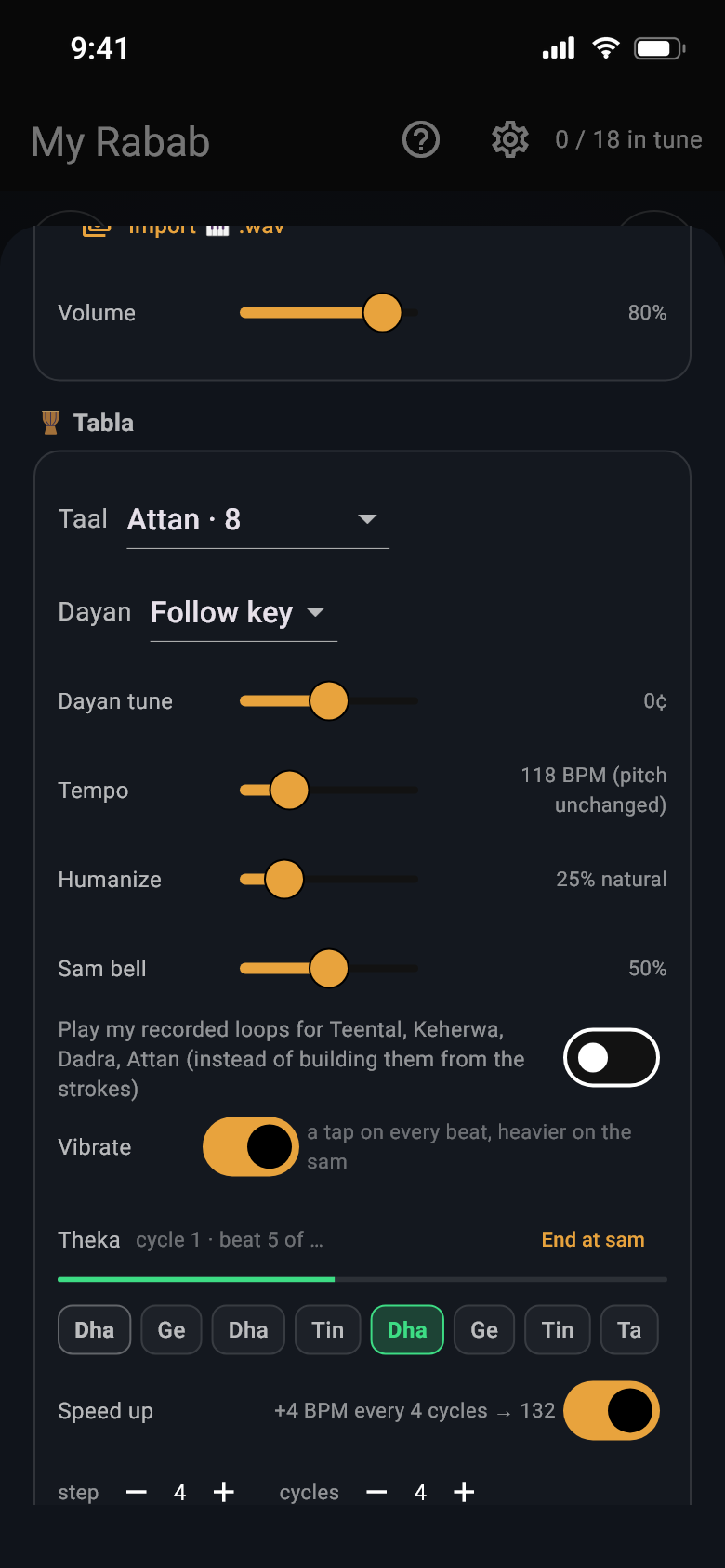
- The theka, lit as it plays — every bol of the cycle written out, the sounding one lit from the loop's own clock, with the cycle and beat counted. Tap any bol to hear it on its own.
- A tempo trainer — add a few BPM every few cycles up to a ceiling you set, and it only ever steps on the Sam.
- Felt as well as heard — a Sam bell with its own level, a pulse on every beat and a heavier one on the Sam, and End at Sam so stopping lands on the downbeat instead of mid-cycle. A progress bar and a practice timer run in the theka strip.
- Save your setups and give them names. Shrink the console and a small player keeps going while you tune.
- It never confuses the tuner — the app made the accompaniment, so it knows its own sound and ignores it. Your Rabab still reads and glows while it plays.
Eleven taals, every one a real tabla
- TeenTaal16 beats
- Tilwada16 beats
- Deepchandi14 beats
- Jhumra14 beats
- EkTaal12 beats
- Jhaptal10 beats
- Keherwa8 beats
- AttanPashto 8
- KhattakPashto 8
- Rupak7 beats
- Dadra6 beats
All eleven are built stroke by stroke from recordings of a real tabla — two takes of every bol, so a repeated stroke alternates between them instead of stamping the same sample twice. Because the drum is assembled rather than stretched, anywhere from a slow 40 to a fast 320 beats a minute sounds like a drum, at any pitch. Your own recorded loops are still there, one switch away.
Five naghma styles
- Kabulithe city style
- Bairamithe Afghan Bhairavi colour
- Logarithe Logar dance style
- Kesturia Pashtun mode
- Paria Pashtun mode
The lehra is written for the raga, the taal and the laya together, with Bhatkhande's accents, the small kan and murki ornaments a player would add, and the swell of the bellows behind it. Repeated notes are held rather than re-pressed, the way a hand does it, and the cycle comes home on the Sam. Add a little human unevenness if you want it played rather than printed — the balance between the two instruments is already set so nothing distorts, whatever you do with the sliders.
Your harmonium. Your tabla. One minute.
Press one button, play for a minute, and the app turns your own instrument into a loop you can practise with — cleaned up, trimmed and joined so it repeats smoothly. All of it happens on the phone.
- It won't accept a bad take — too quiet, too short, or nothing really played, and it tells you instead of saving the sound of an empty room.
- Talking in the background is dropped — the way it pulls the harmonium out of the recording leaves voices behind.
- The tuner still understands it — your recorded harmonium keeps its pitch and your recorded tabla keeps its beats, so neither one confuses the tuner.
- Or bring your own file — import a recording you already have.
What gets saved
One sound file per recording, kept privately on your phone under the name you give it. Delete the loop and the file goes with it. It is never uploaded.
How many
As many as you like — each becomes a little tag you tap to choose. They start out called "My tabla" and "My harmonium".
While a loop plays
Strings stop glowing, so a rhythm track can never be mistaken for your playing, and a card on the tuning screen offers to stop it.
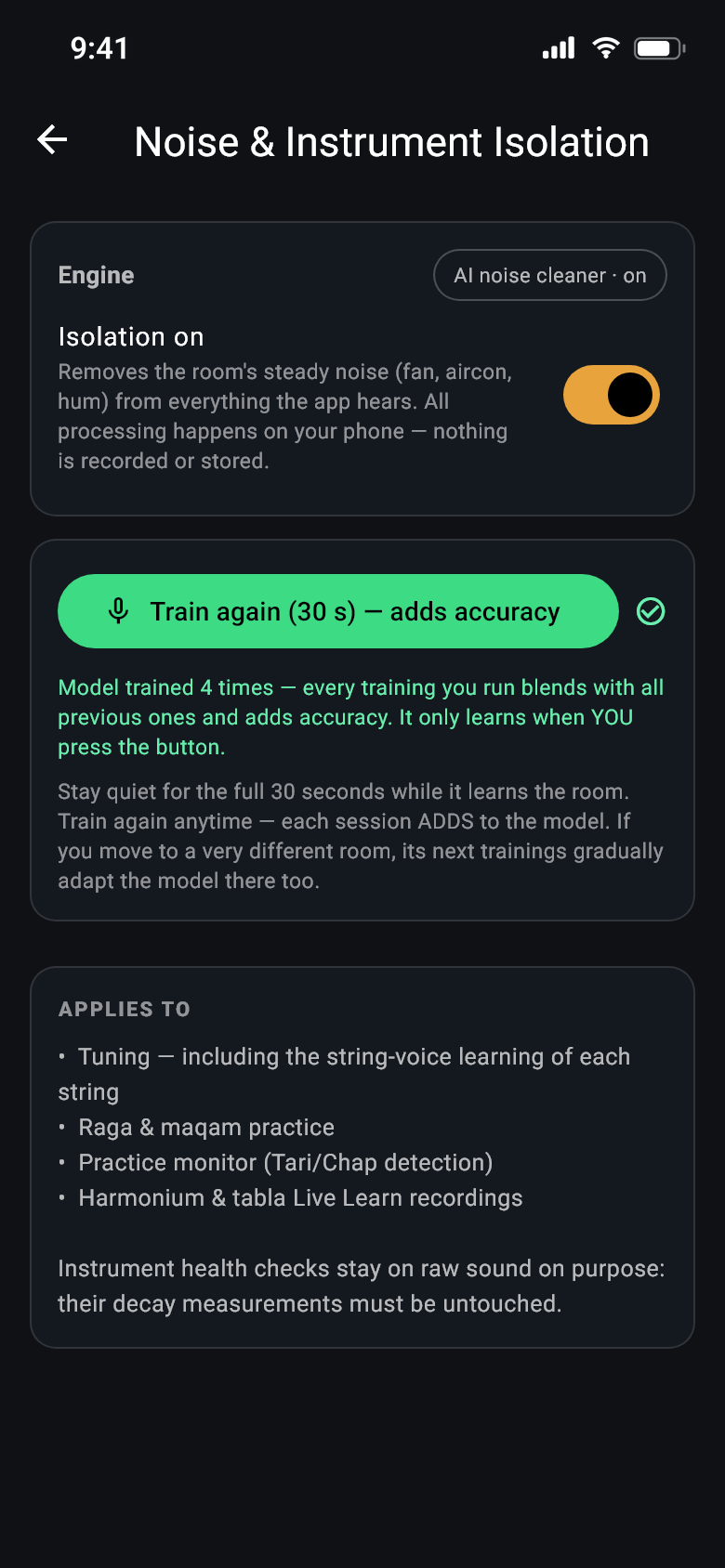
Thirty quiet seconds, and the room stops getting in the way.
Sit still for half a minute while the app listens to your room. From then on it knows what your fan, air conditioner or the hum from the street sounds like, and takes it back out of everything it hears. It doesn't keep the recording — only a description of that steady background sound.
- It helps everywhere — tuning, raga practice, stroke reading, and recording your own instruments.
- Do it again any time — each go adds to what it already knows, and a new room is picked up gradually.
- It only listens when you ask — it never learns the room quietly in the background.
- Off is properly off — with the switch down, the sound reaching the tuner is untouched.
- The check-up is left alone on purpose — measuring how your Rabab rings needs the raw, unfiltered sound.
On newer phones it does a bit more
If your phone has the chip for it, the app uses a smarter clean-up and can even separate a tabla from a harmonium in a recording. If it doesn't, the simpler method takes over and you won't notice — and the app only claims the fancy version when it is genuinely running.
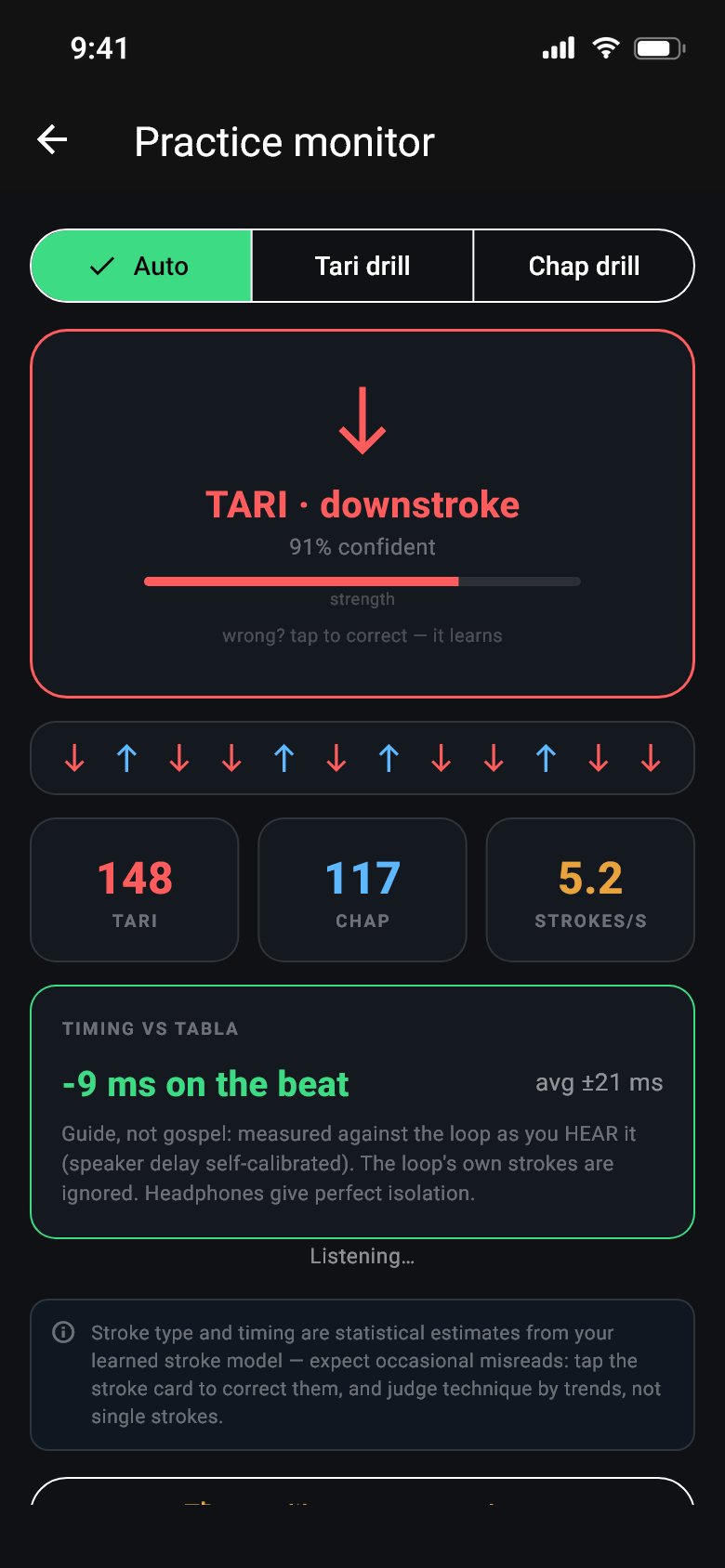
Animated preview of the practice monitor
Tari or Chap — learned from your hand.
The app hears every stroke of the plectrum and says which direction it went. It works this out from the way your strokes begin, learned from your own playing, and it keeps learning: every drill you run and every correction you make sharpens it. A new install already knows a fair amount, so it is useful from the first day.
- Two ways to teach it — a short guided session of twelve down then twelve up, or simply tell it "these are all Tari" while you practise.
- Tap to correct — one tap fixes a wrong reading, and it remembers.
- Only your Rabab counts — a knock on the table or a door closing isn't counted as a stroke.
- Nor is your own voice — humming or singing along while you play used to read as strokes, because a sung syllable starts much like a pluck and lands on a note the instrument has. The app now knows the difference: in testing it threw out 39 of 41 sung syllables while losing 1 stroke in 204.
- Tabla out loud is fine — the app can tell the drum from your strokes, and headphones make it perfect.
- It looks at whole runs — a fast passage is read as a passage, not as isolated strokes, but a deliberate up-down tremolo is left alone.
What a session tells you
- CountsTari and Chap, with how sure it is
- Speedstrokes per second
- Timingahead of or behind the tabla
- Reportwhat improved, what to work on
- Historyyour last 60 sessions
The app is honest about this: telling a downstroke from an upstroke by sound alone is genuinely hard, because the difference is over in a split second. A short drill teaches it your hand and makes a real difference — and the screen says as much.
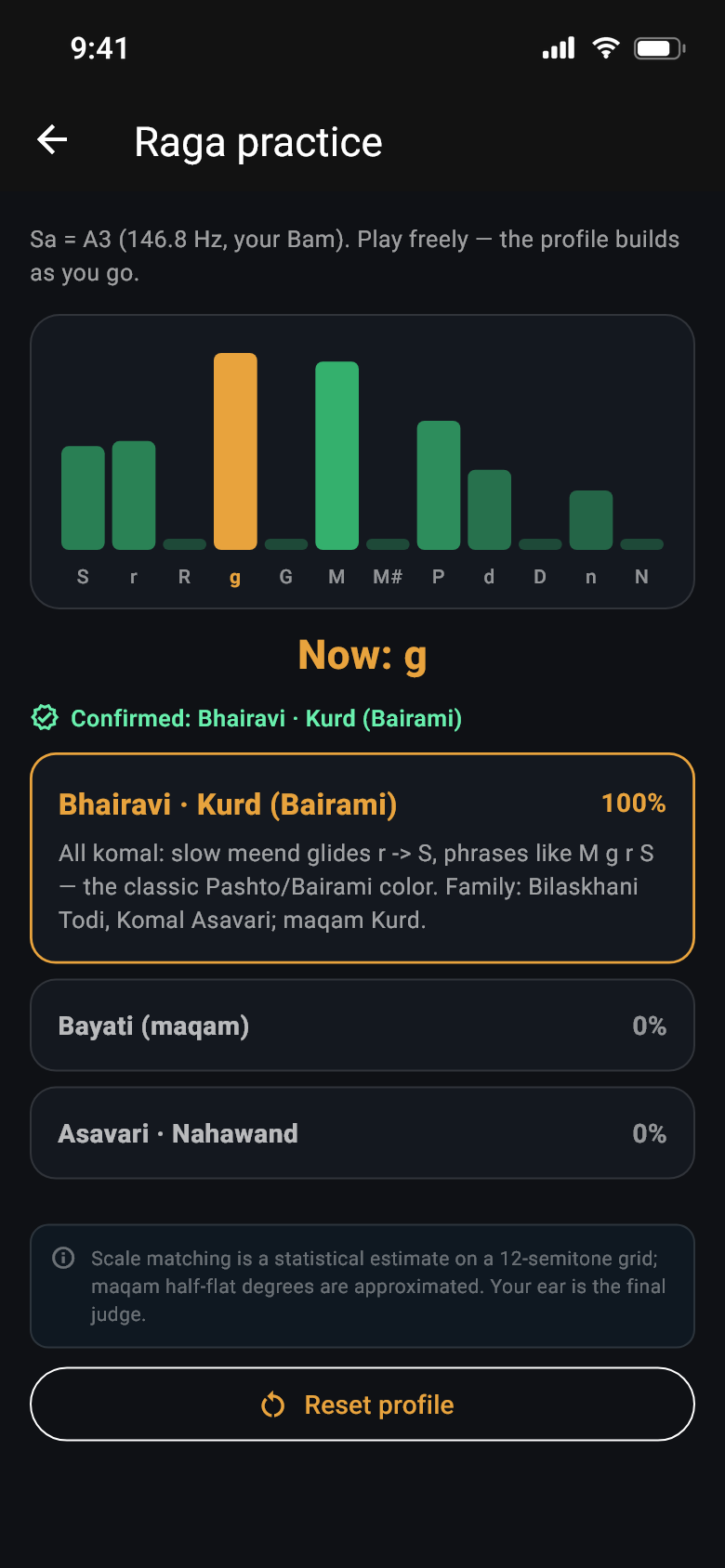
Animated preview of the raga practice screen
Play, and it names the scale.
Twelve bars fill up as you play, one for each note above your Sa, showing where you have been spending your time. From that the app works out which raga or maqam you are in — and because it listens finely enough, it can hear the quarter tones that separate one maqam from another.
- It waits until it's sure — instead of guessing early, it tells you which note would settle it: "dwell on R half-flat".
- Three closest matches, ranked, with any notes you played that don't belong marked in red.
- A phrase to try for the leading match, written the way a teacher would say it.
Twenty-four to match against
Where the same scale has two names in two traditions, it is listed once under both.
Amber: the ten thaats · plain: maqam families, with their quarter tones · green: five-note ragas.
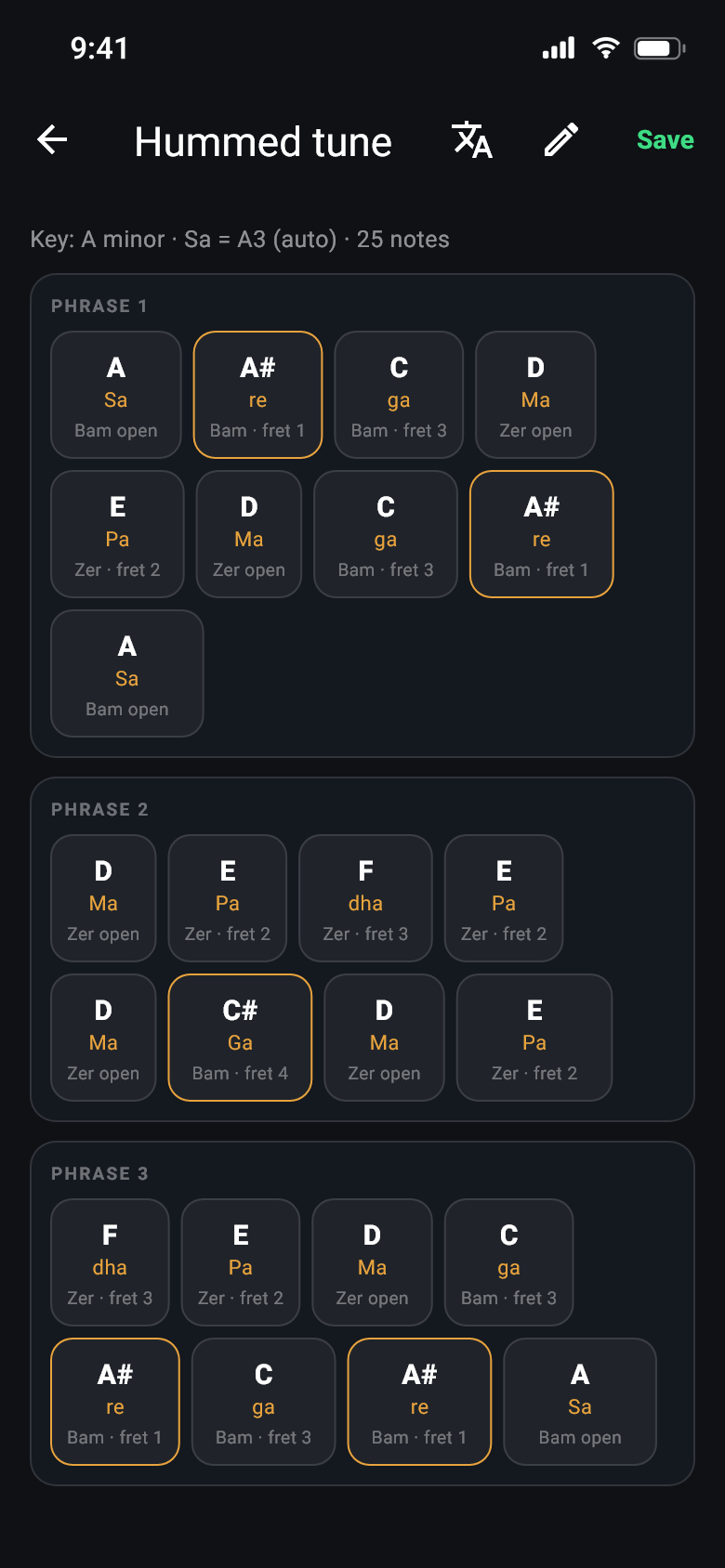
Song to Notes is a preview — check every sheet, and expect it to get better with each update
Hum it, and the notes are written for your Rabab.
The method rabab teachers use with a tuner and a sheet of paper — sing a note, read the letter, write it down — done for you. Hum a tune, or let the phone listen to a song playing in the room, and the app writes the notes in sargam or Western letters, each one with the string and the fret to play it on your own tuning.
- Hum to Notes — your voice, read by a pitch model made for singing, one note at a time or a whole line. Hold a note and it settles; slides between notes are not written as notes.
- Live Listen — a song out loud. The app picks the singer out of the band and transcribes the voice alone; a second, deeper pass runs when you tap Done.
- On the beat — record to a click and the notes snap to it; sing freely and the app reads the tempo from where your notes start (“~ 96 BPM”) and offers the grid. See them as sung or on the grid, with note values.
- Fit to my rabab — a song in G, a rabab tuned to E: one tap shifts the sheet, and every chip says where to play it.
- Review & Edit — a note sung between two letters is marked with its cents and left for you to decide; "Fit to scale" offers the raga that explains the sheet; tidy up drops the glitches.
- Practise it in the app, or export the sheet as MIDI.
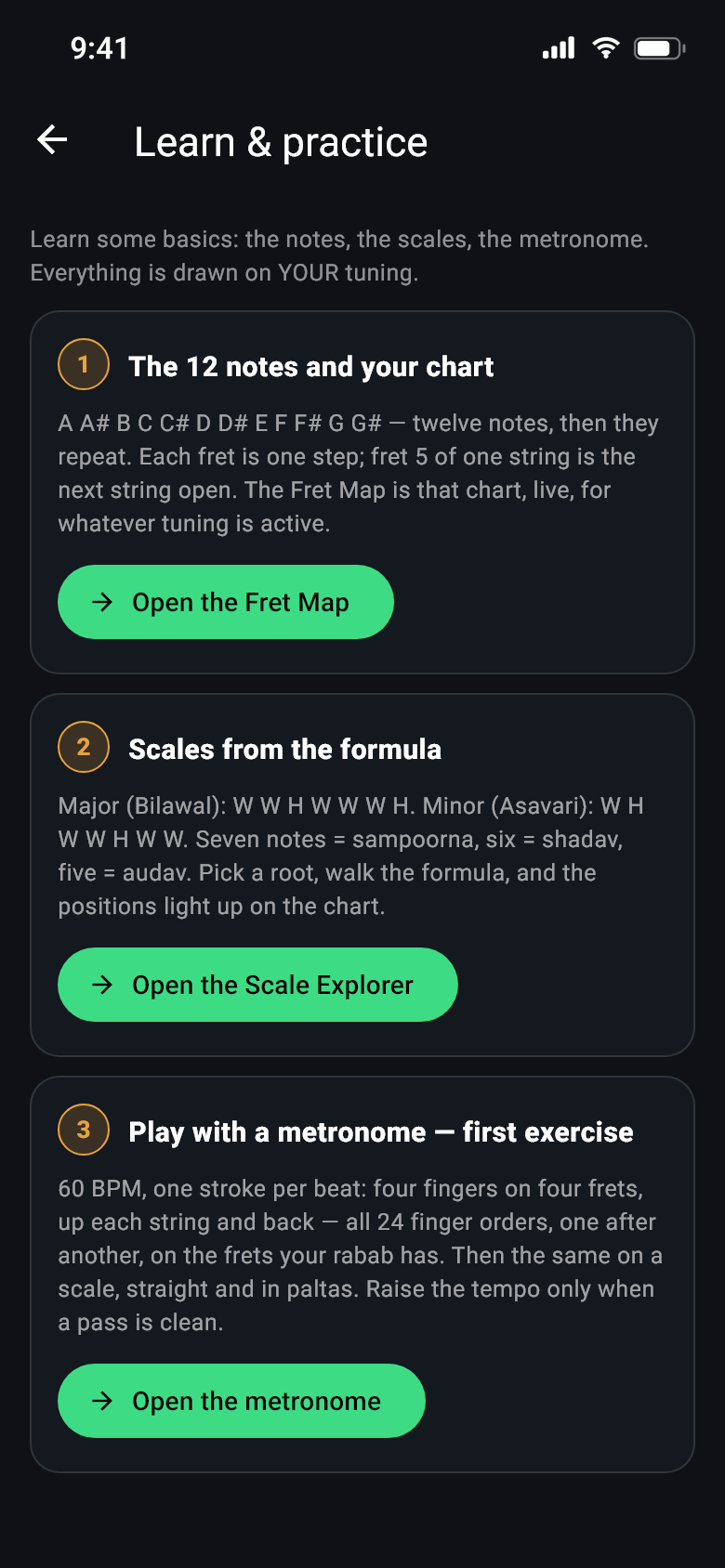
The order theory is taught in, each step opening the tool for it
The theory lesson, drawn on your own strings.
Three steps in the order a rabab teacher gives them, and every one of them uses the tuning you set up — not a generic chart.
- The twelve notes and your chart — A to G# and back round, one fret per step, and a Fret Map that is live for whatever tuning is active.
- Scales from the formula — Bilawal, Asavari, Kafi, Khamaj, Kalyan, Bhairav, Bhairavi, Bhupali, Dhani. Pick a root, walk the steps, hear it, and see the positions light up on the neck.
- A listening trainer — play the scale straight, in pairs, triplets, fours or thirds (the paltas), with or without the click, and the app ticks each clean run and shows where you were early or late.
- The metronome exercises — all twenty-four orderings of the four fingers, not just 1-2-3-4, each at the positions your own fret count allows, then the same discipline applied to scale runs. Tari or Chap as marked; raise the tempo only when a pass is clean. The click is gapless, and the screen stays on while your hands are busy.
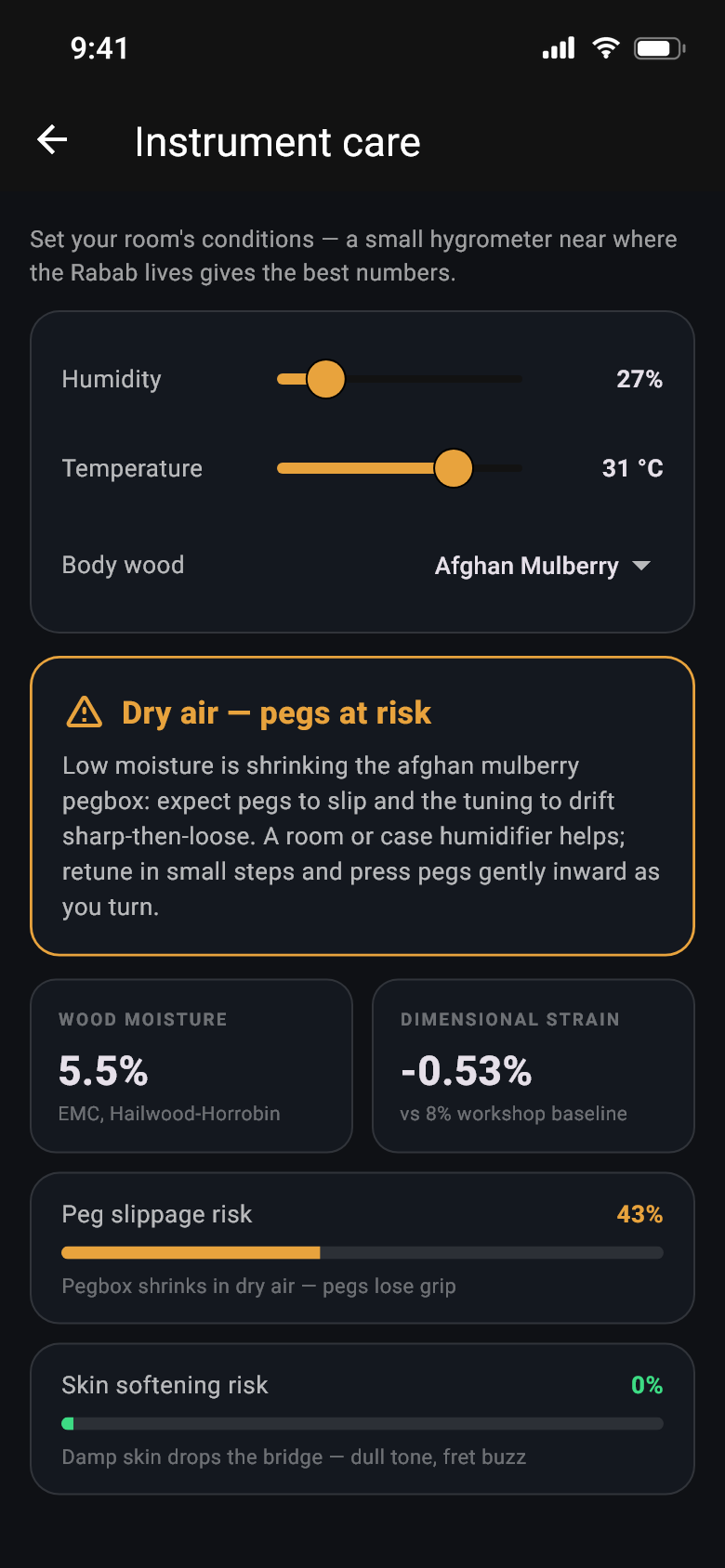
The two things that actually ruin Rababs.
Tell the app how warm and how damp it is where the instrument lives — a cheap hygrometer next to the case gives the truest numbers, and the app says so, because a phone can't measure humidity. From there it works out how much moisture the wood is holding, and what that means for your instrument.
- Slipping pegs — when the air gets too dry the pegbox shrinks and the pegs stop holding.
- A soft skin — when it gets too damp the goatskin slackens, the bridge sinks, and the tone goes dull.
- Choose your wood — Afghan mulberry, walnut or maple. Each one moves differently.
- Real advice, not a colour — case with a damp sponge, a silica pack, warm it up slowly, loosen the strings in heat.
- Which way it will drift — flat, sharp or steady. It won't invent a number it can't know.
- Tomorrow's air, if you want — type a town and see the hours when things turn risky. It asks before going online, and you can switch it off again.
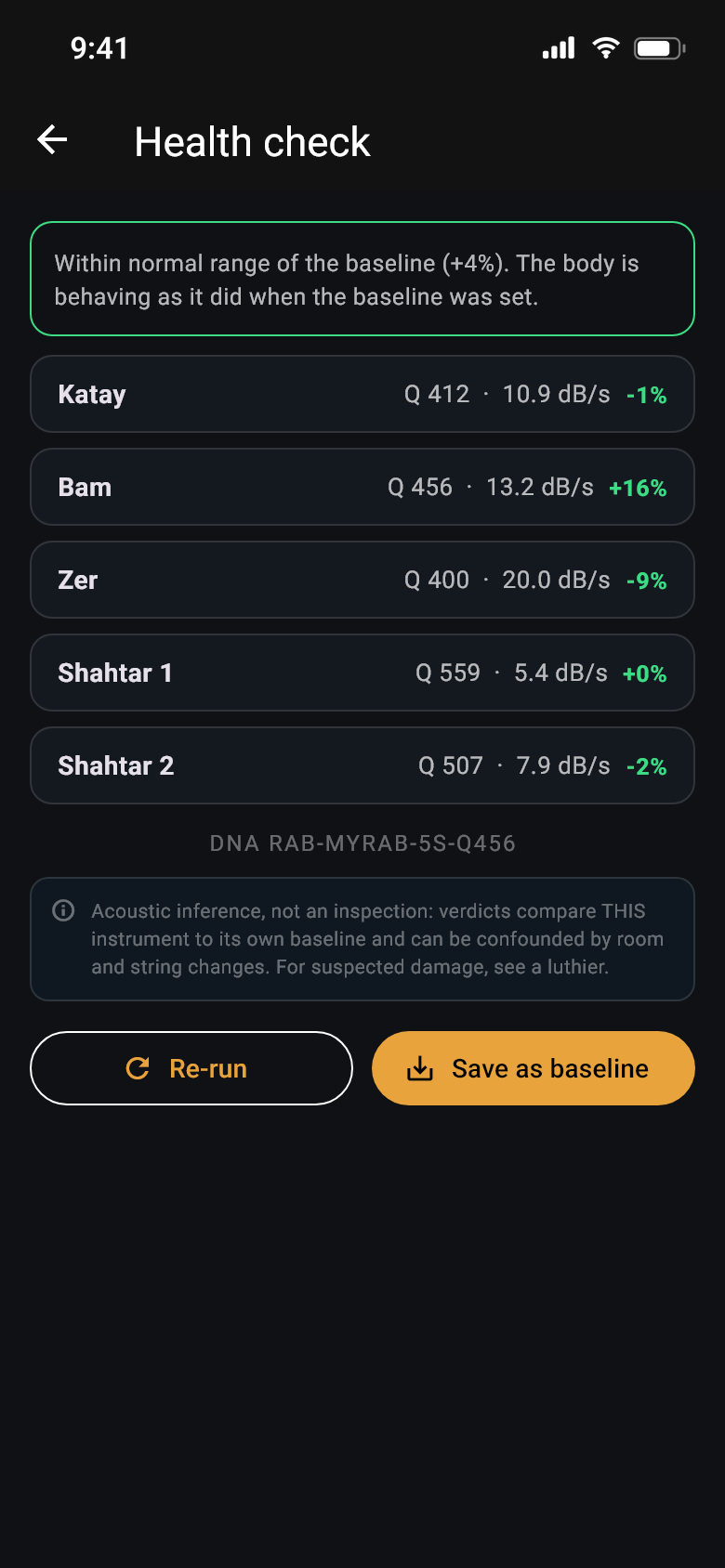
How your Rabab rings, watched over the years.
When wood dries out or a crack starts, the instrument stops ringing for as long as it used to — and that shows up in the sound long before you can see anything. The check-up asks you to pluck each main string once, listens to how long the note takes to fade, and writes it down.
- It only compares you to you — never to some ideal Rabab. The first check becomes your baseline.
- A history of your last two dozen checks, with the date and how each compares.
- A little signature for your instrument, like RAB-KABUL-5S-Q412. Purely for fun.
- Do it the same way each time — same room, same strings — and the numbers mean something.
Set up in a minute
A few short questions the first time you open it: your three melody strings, how many drones, how many Bachi, how many frets, which tuning — and why the microphone helps.
A quick tour
A nine-step walk through the app that runs once and can be replayed any time from the question mark at the top, including a look inside the Tools menu.
Everything in one menu
Saved setups, string pitches, your instrument, extra instruments, care, practice, noise, raga and the check-up. Every one a proper page you can back out of.
Built for when things go wrong
Microphone refused, headphones pulled out mid-session, a loop playing out loud, no internet, an older phone — each of these has a sensible path that keeps the app usable instead of showing you an error.
Easy on the eyes
One dark theme made for a dim practice room, with amber when something needs attention and green when it's right — and a colour for each string, the same on the picture as in the readout: amber Katay, blue Bam, violet Zer, silver Shahtar, cream Bachi.
Ready when your Rabab is.
Everything above is in one subscription — one month free, then $8 a year. Out now on Google Play; the App Store version is on its way.
Billed by Google Play or the App Store, renews until you cancel, and cancelling takes seconds in your store account — what it costs.
 Coming soon to theApp Store